How SharpAPI’s Invoice Parsing API Can Save Your Finance Team Hours Every Week
Picture this: It’s Monday morning, and your accounts payable team is staring down a pile of invoices. PDFs, scanned documents, photos from mobile phones — all in different formats. Someone is manually copying vendor names into spreadsheets, another is double-checking totals, and a third is trying to reconcile line items against purchase orders. It’s slow, tedious, and, frankly, stressful.
If this scenario feels familiar, you’re not alone — and it’s exactly why the Invoice Parsing API by :contentReference[oaicite:0]{index=0}, now available on ApyHub, exists. This API automatically transforms any invoice into structured JSON with over 100 fields, eliminating manual entry, reducing errors, and giving finance teams back their time.
Explore it here: SharpAPI Invoice Parsing API
01Turning Chaos into Structure
Invoices come in all shapes and sizes:
- Digital PDFs, scanned TIFFs, or mobile photos
- Multi-page documents with tables and attachments
- Varying layouts, fonts, and regional tax formats
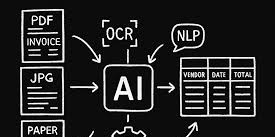
Trying to extract useful data manually or with simple OCR is a nightmare. The Invoice Parsing API handles all of it, automatically structuring:
- Seller and buyer information
- Invoice numbers, references, and metadata
- Issue and due dates
- Line items with quantity, description, unit price, and totals
- Subtotals, taxes, discounts, and grand totals
- Payment terms, logistics, and e-invoice metadata
- Currency and regional tax identifiers
All of this comes back as normalized JSON, ready to plug into your workflows.
02Real-World Benefits
Streamline Accounts Payable
Invoices no longer sit in inboxes waiting for manual entry. The API extracts vendor details, totals, due dates, and line items automatically. Teams can route invoices for approval and trigger payment workflows without lifting a finger.
Impact: Faster processing, fewer errors, and on-time payments.
Integrate Seamlessly with ERPs
Push structured invoice data into platforms like SAP, Oracle, NetSuite, QuickBooks, or Xero. Map fields once, automate journal entries, and reconcile purchase orders with ease — regardless of invoice layout or origin.
Gain Spend Insights
With structured invoice data, tracking vendor spend, monitoring pricing trends, and aggregating departmental expenses becomes simple. Dashboards and analytics turn previously unstructured invoices into actionable intelligence.
Handle Global Operations
The API extracts currency codes, exchange rates, and regional tax IDs, making multi-currency and cross-border invoice processing effortless. Compliance becomes automatic, not a headache.
Reduce Fraud and Validate Payments
Compare invoices to purchase orders, detect duplicates, flag mismatched totals, or identify unusual pricing patterns before payments go out. Automation strengthens internal controls and reduces risk.
Automate Expense Management
Parse employee-submitted receipts and invoices automatically. Validate totals, flag policy violations, and maintain a clean, structured audit trail — all without manual review.
03How It Works
The workflow is simple and asynchronous:
- Submit an invoice file via POST request.
- Receive a job ID and status URL.
- Poll the status until processing completes.
- Retrieve structured JSON with 100+ fields.
This makes bulk processing and enterprise-scale automation straightforward.
04Why Access SharpAPI via ApyHub
Using SharpAPI through ApyHub gives you:
- Unified API access across multiple providers
- Flexible atom-based pricing for cost optimization
- Centralized authentication and monitoring
- Enterprise-ready scalability
- Easy testing in the ApyHub playground
05Conclusion
The Invoice Parsing API by SharpAPI on ApyHub turns the nightmare of manual invoice processing into a fully automated workflow. From scanned PDFs to mobile photos, every invoice is parsed into structured JSON with over 100 fields.
Accounts payable, ERP integration, spend analytics, fraud detection, multi-currency compliance — all become faster, easier, and more accurate. Your finance team can finally focus on strategic work instead of data entry.
Explore the API here: SharpAPI Invoice Parsing API
06Frequently Asked Questions (FAQ)
What types of invoice files can the API process?
The API supports PDF, DOC, DOCX, JPG, JPEG, PNG, TIFF, and TIF. It can handle scanned documents, flattened PDFs, or mobile photos.
How many data fields does the API extract?
The API extracts over 100 structured fields, including seller/buyer info, invoice numbers, line items, totals, taxes, payment terms, logistics data, and metadata.
Can it handle invoices with poor quality or unusual layouts?
Yes. The AI-based engine is designed to extract data accurately from low-resolution scans, crumpled photos, and non-standard invoice templates.
Can I process multiple invoices at once?
Yes. The API supports asynchronous job submission, allowing bulk invoice processing efficiently for enterprise workflows.
What format is the extracted data returned in?
All data is returned in structured JSON, organized into logical sections for easy integration with ERP, accounting, or finance platforms.
Which accounting or ERP systems can I integrate with?
Structured data can be fed into most platforms, including SAP, Oracle, NetSuite, QuickBooks, Xero, or any custom accounting solution.
Does the API support multi-currency and regional tax compliance?
Yes. It extracts currency codes, exchange rates, and VAT/GST/SST identifiers, making it suitable for global finance operations.
Can this help with fraud detection or invoice validation?
Absolutely. The API allows you to compare invoices against purchase orders, detect duplicates, flag mismatched totals, and validate vendor information automatically.
How is pricing handled?
Pricing is flexible through ApyHub’s atom-based system, allowing you to optimize for file size and volume while controlling costs.
How do I get started?
Visit the API page on ApyHub: SharpAPI Invoice Parsing API for documentation, request/response examples, and integration guides.